Many cart-recovery tools start at the checkout. Cart Spy also tracks the carts shoppers build and never take to checkout — on our own store, that is where most abandoned carts stop.
⤢ Click to expand
Checkout-based recovery only starts once a shopper reaches checkout. Many never do — they add to cart, browse, and close the tab. Shopify's abandoned-checkout report never sees those carts.
Shopify's "Abandoned Checkouts" only tracks carts where the shopper started the checkout flow. Everything before that vanishes.
Without a session recorder running, you can't see what made a shopper bail. They just become a missing data point in your conversion funnel.
A shopper who added a $1,200 cart and left without checking out is exactly who you want to email. You just have no way to know they existed.
Cart Spy's tracker runs on every storefront page. The moment a shopper clicks "Add to cart", we capture it — independent of whether they ever click "Checkout". You see the real abandonment funnel: browse → cart → checkout → purchase, with carts at every stage.
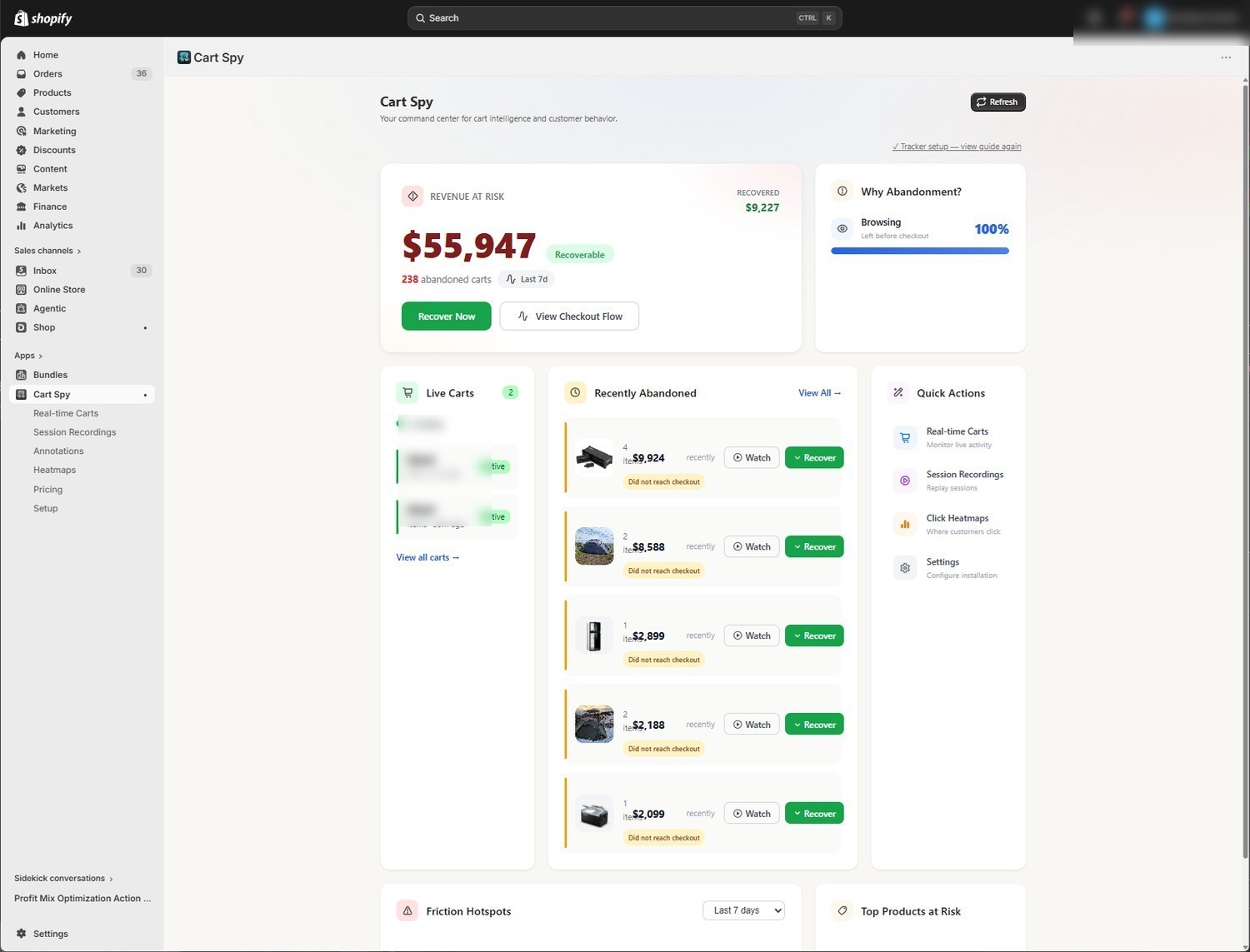
The dashboard surfaces the highest-value carts that never made it to checkout, sorted by total cart value. That's where the missing revenue is.
Cart analytics, session recording, heatmaps and a live cart dashboard — every signal from your storefront feeds one place, with no extra tools to bolt on.
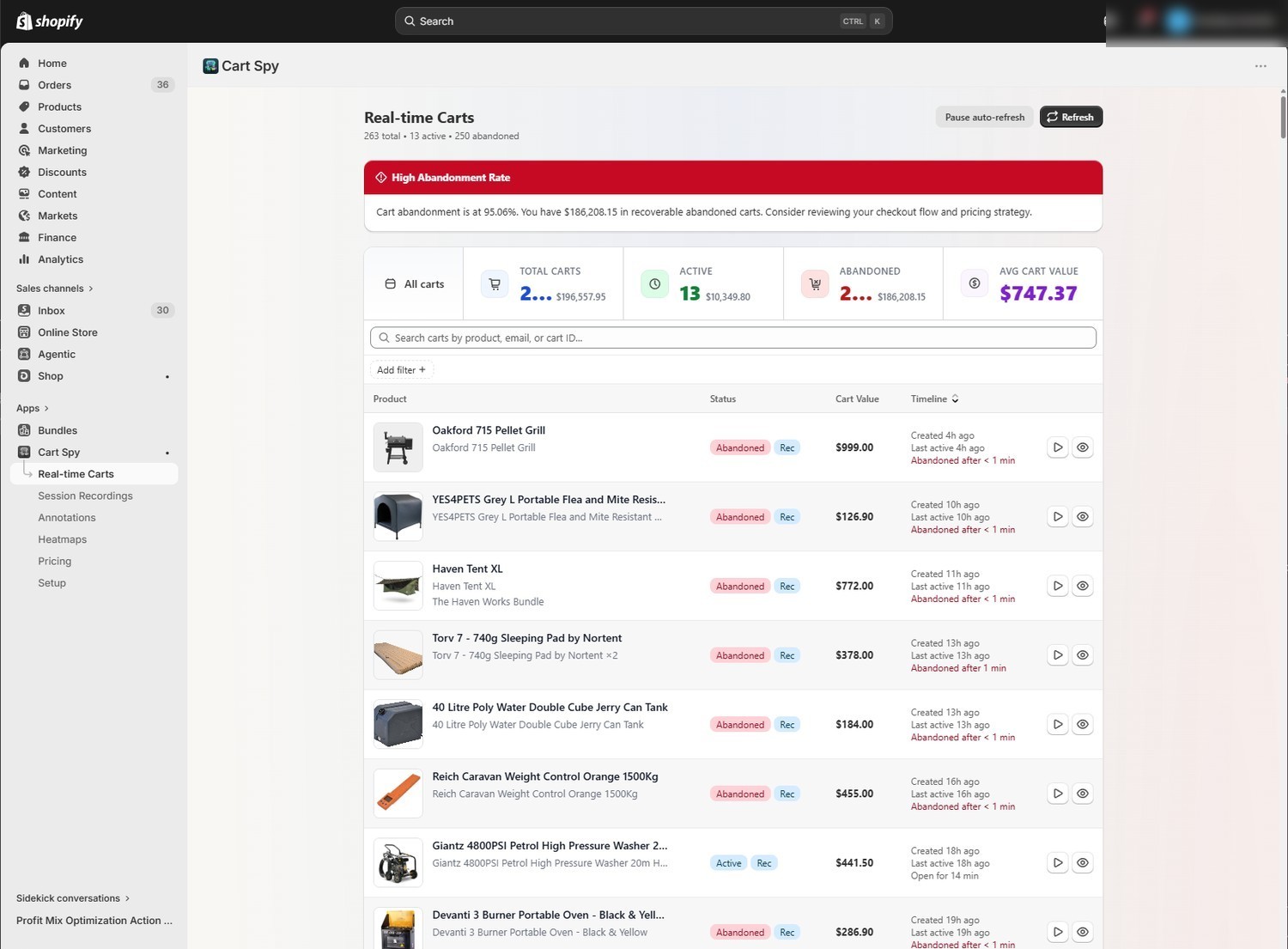
Live carts updating every 30 seconds. See what's in shoppers' carts and what each one is worth, in your store's own currency.
The cohort other tools miss — shoppers who add to cart and close the tab before reaching checkout, ranked by cart value.
Watch the replay of an abandoning shopper's session — the pages they saw, what they clicked and how far they scrolled. Form fields are cleared before anything leaves the browser.
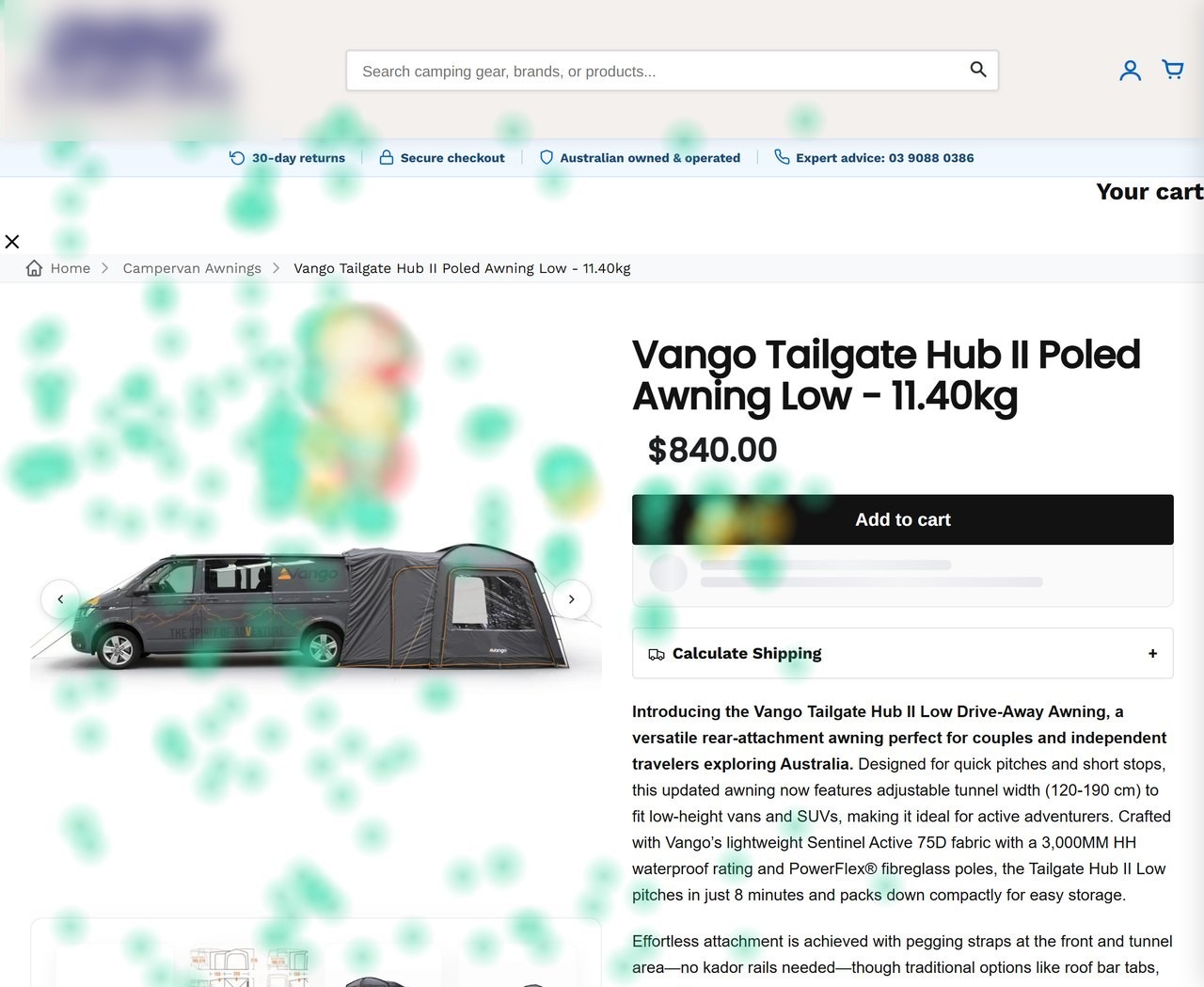
Aggregate click density and scroll depth per page. See which CTAs get attention and how far down the page shoppers actually scroll. Pro
Step-by-step drop-off from checkout started to order complete, the checkout steps losing the most shoppers, and the errors Shopify showed them. Pro
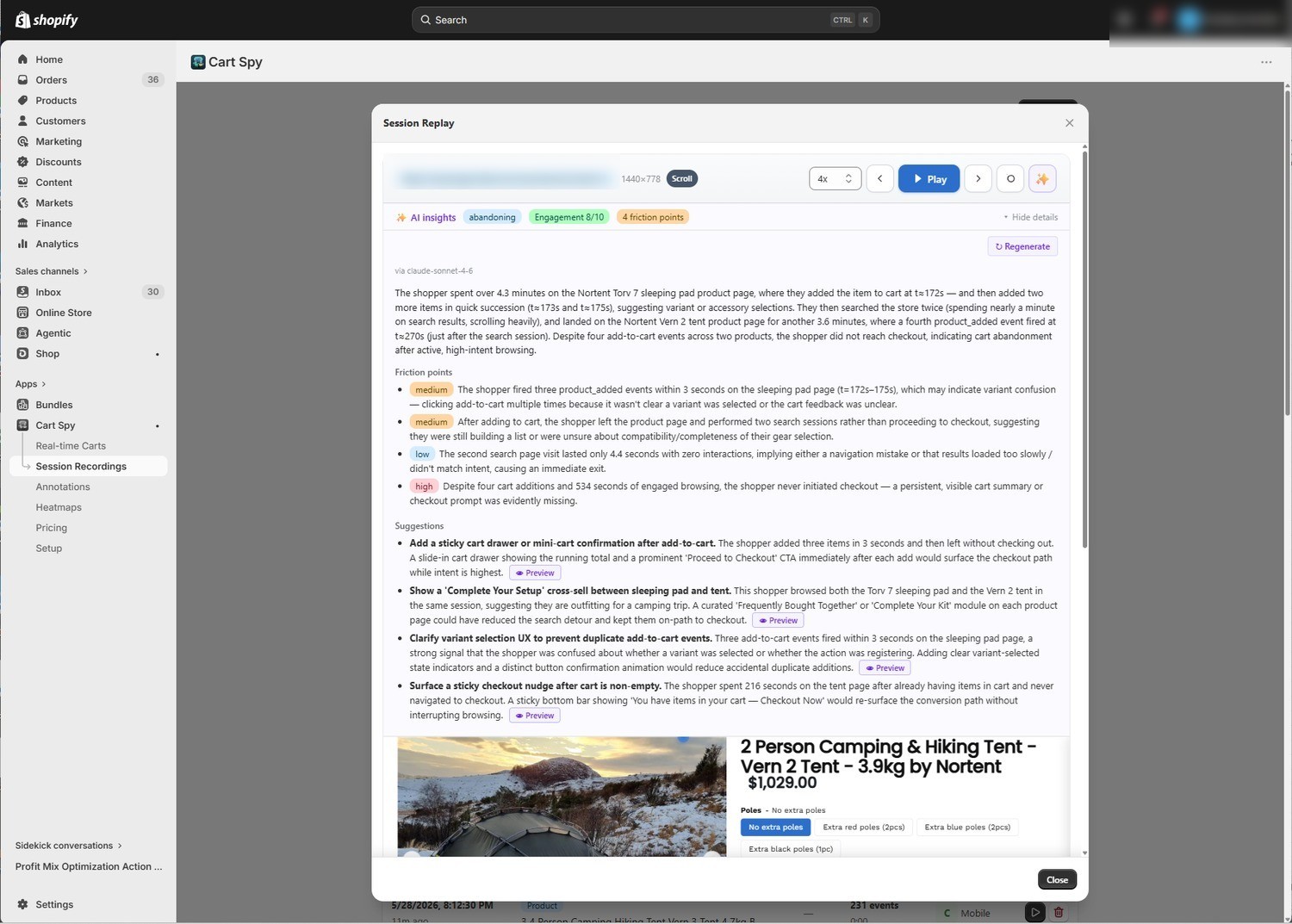
Plain-English summary of what happened in a session — the products viewed, the moment of hesitation, the likely reason for bailing. One click per session. Starter+
Product views that landed on something out of stock and, on Pro, shoppers Shopify refused at checkout for stock, with the line they were short of.
Products shoppers look at but seldom add to cart, and a deep dive comparing what the shoppers who carted a product did with those who left.
Your week in carts, checkouts and orders, the abandoned carts with links to their replays and, once there's enough data, what is worth fixing — in your store's currency.
Real screens from a live store — from the moment an item hits the cart to the full session journey behind it.
⤢ Expand
Every active and abandoned cart as it happens — with value, status and time since last activity.
⤢ Expand
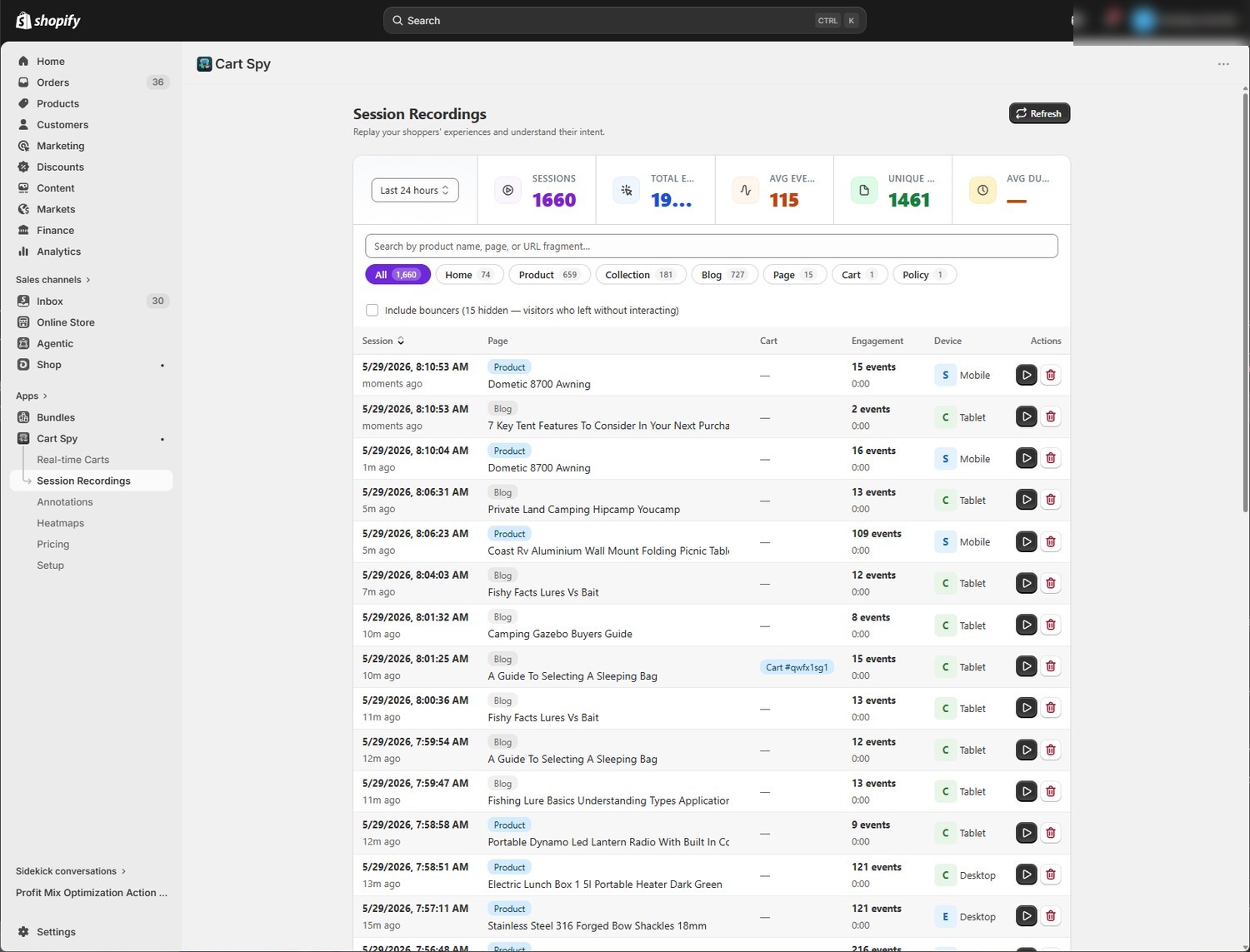
Browse and search every recorded session by page, product, device and engagement.
⤢ Expand
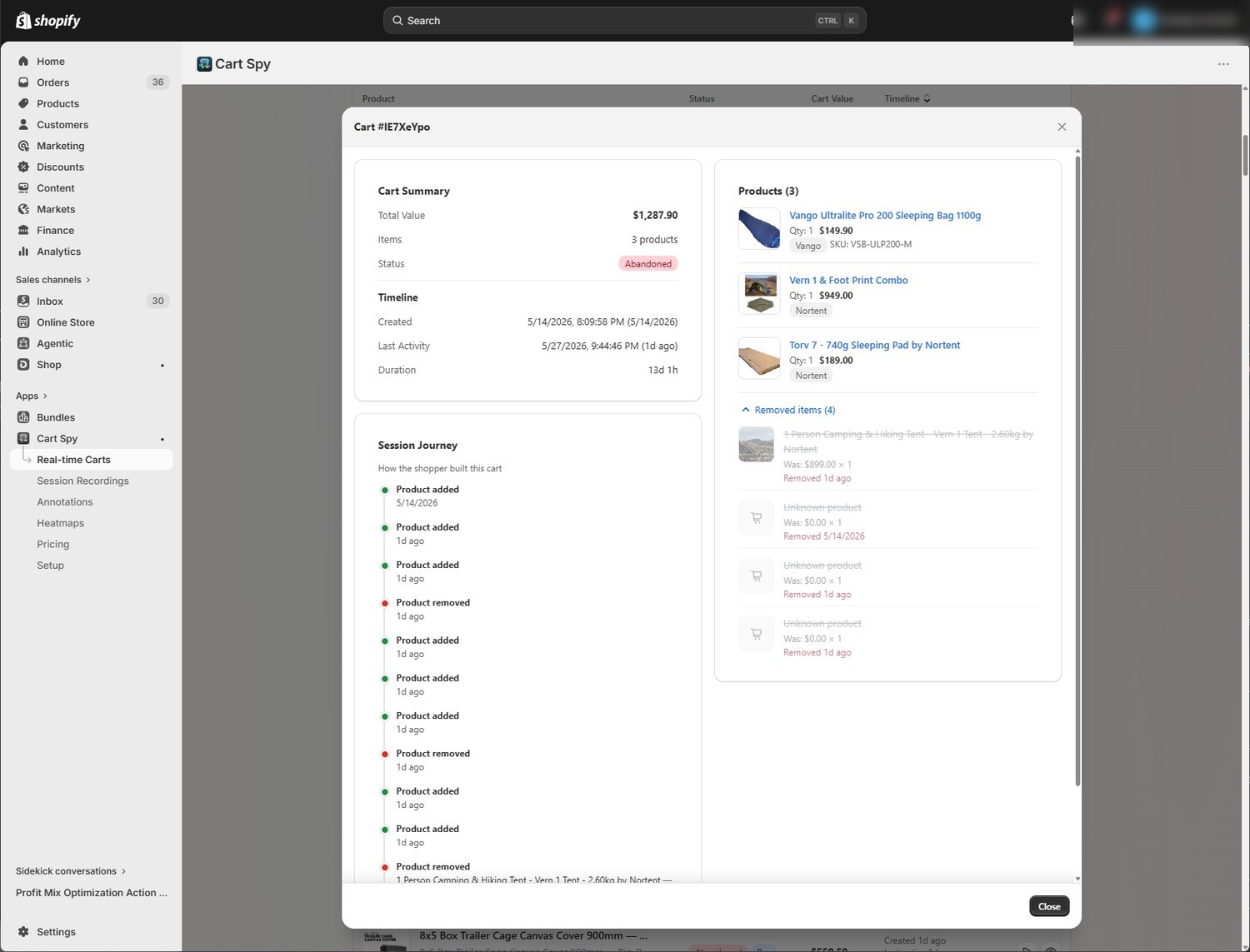
Drill into any cart: the products inside and the full timeline of every add and remove.
Real sessions and real click data from a live Shopify store — replay abandoning sessions, and see each page as a click & scroll heatmap.
Cart actions, clicks and scrolls replayed as the shopper saw them. Form fields are cleared before anything leaves the browser.
⤢ Expand
Aggregate click density and scroll depth per page. See which CTAs pull attention and how far down shoppers actually scroll before they bail.
One click turns any session into a plain-English analysis — the friction points, the moment of hesitation, and concrete suggestions to recover the next shopper like them.
Connect Cart Spy to Claude, Cursor, or any MCP-ready assistant. Ask about your carts, sessions and checkout funnel in plain English — then let your assistant turn what it finds into fixes, using your own Shopify tools.
"Why are shoppers abandoning on mobile?" "Show me last week's checkout drop-off." Your assistant queries Cart Spy directly — no dashboards to dig through.
Cart Spy hands your assistant structured defect reports built from your AI session insights — the issue, the page it happens on, and where to fix it — so it can act with your Shopify CLI or dev tools.
Scoped to your store, read-only, and it never edits your theme. Sign in with your existing Shopify session — your data stays under your control.
Add this server to your AI client
https://api.cart-spy.com/mcp
Then ask: "What's hurting my conversion this week?"
Available on the Pro plan. Works with any assistant that supports the Model Context Protocol (MCP).
Start free, upgrade when it pays off. Everything in Pro is actually built — no "coming soon" features. Save ~20% with annual billing; paid plans include a 7-day free trial.
A cart is one shopper's cart in a month, counted once no matter how many times they change it — so you pay for the shopping you can see, not for the traffic that never added anything. Session recordings have their own much larger allowance; past it, new sessions are recorded as a sample and cart tracking carries on untouched.
Paid plans include a 7-day free trial — you're not charged until it ends. All charges are billed in USD through Shopify; monthly plans bill every 30 days, annual plans bill once a year. Change plan or cancel anytime from inside the app.
Hotjar and Lucky Orange are great session-recording tools, but they treat carts as just another page event. Cart Spy is built around the cart: it tracks each cart's identity, value and conversion state, and the dashboard's headline number is revenue at risk in abandoned carts, not session count. Its tracker is made for Shopify: it reads /cart.js, watches the store's cart API calls as they happen, and matches cart tokens against Shopify order data.
The tracker is a single async script (no render-blocking) and sends its data with navigator.sendBeacon, so it doesn't hold up your store's own requests. An upload too big for the browser's beacon limit is split into pieces under 48 KB, so it still arrives when the shopper leaves the page.
Session recordings clear every form-field value, and never record keystrokes from password or payment fields, before anything leaves the browser. Customer account pages are never recorded. Visible page text is recorded so the replay looks like the page; add data-cs-mask, or your own selectors in the app embed settings, to replace any text with asterisks. We handle Shopify's GDPR webhooks (customers/data_request, customers/redact, shop/redact) and uninstalling the app deletes your shop's data.
You get full access on whichever plan you pick. Shopify doesn't charge you until day 7. Cancel any time before then and you're not billed. After the trial, Shopify charges through your existing Shopify billing — same line item as other apps.
Yes. Change plans from the Pricing page inside the app and approve the change on Shopify's confirmation screen; Shopify handles the billing. Moving to Free cancels your paid plan straight away.
Yes — on the Pro plan, Cart Spy runs an MCP server so you can connect it to Claude, Cursor, or any MCP-ready assistant. Click Connect your AI inside the app, add the server URL (https://api.cart-spy.com/mcp) to your client, and approve. Your assistant can then query your carts, sessions and checkout funnel in plain English — read-only, scoped to your store, and it never edits your theme.
The tracker doesn't start for known crawlers, headless browsers and automation tools (Googlebot, Bing, ClaudeBot and the like), so they create no recordings or carts. Sessions that look automated are flagged and left out of your recording count.
Cart data and metadata are stored in Neo4j (a graph database) on Hetzner servers in Singapore; session recordings are stored compressed in Hetzner object storage in Germany. All traffic is over HTTPS. We don't sell or share your data with anyone; it is used only to run Cart Spy for your shop.
Install Cart Spy in two clicks, point it at your store, and start seeing the carts your other tools miss within minutes.